How to Use AI to Generate Images and Videos Using Prompts: A Complete Guide for Beginners and Creators
“Scroll Down to Get Prompt
👇🏻👇🏻👇🏻
Artificial Intelligence has completely transformed the way digital content is created. Today, anyone can generate high-quality images and realistic videos using simple text prompts, without advanced design or editing skills. AI image and video generation tools are widely used by bloggers, YouTubers, marketers, educators, developers, and social media creators.
This article explains how AI image and video generation works, how to write effective prompts, tools you can use, prompt examples, and best practices to get professional results.
What Is AI Image and Video Generation?
AI image and video generation is a technology where artificial intelligence models create visuals based on text descriptions called prompts. Instead of manually designing or filming content, users simply describe what they want, and the AI generates it.
Example
- Prompt: “A realistic Indian man sitting in a modern office, working on a laptop, cinematic lighting”
- Result: A high-quality AI-generated image matching the description
AI models learn from millions of images and videos to understand styles, objects, lighting, emotions, and composition.
How AI Understands Prompts
AI models break prompts into different components:
- Subject – Who or what is in the image or video
- Action – What the subject is doing
- Environment – Indoor, outdoor, city, village, studio, etc.
- Style – Realistic, cinematic, anime, watercolor, digital art
- Lighting – Natural light, soft light, dramatic shadows
- Camera details – Close-up, wide shot, depth of field
- Quality – HD, 4K, ultra-realistic
The clearer the prompt, the better the result.
Types of AI Content Generation
AI Image Generation
AI generates still images such as:
- Photos
- Illustrations
- Thumbnails
- Posters
- Social media creatives
- Website visuals
AI Video Generation
AI creates:
- Short video clips
- Talking avatar videos
- Animated scenes
- AI-based reels and shorts
- Story-based visual videos
Popular AI Tools for Image Generation
Some widely used AI image tools include:
- Text-to-image generators
- Prompt-based art generators
- Photo-realistic image generators
- AI portrait creators
These tools allow you to:
- Generate images from scratch
- Edit images using prompts
- Enhance image quality
- Change background, clothing, or style
Popular AI Tools for Video Generation
AI video tools help create:
- Text-to-video scenes
- Image-to-video animations
- Talking head videos
- Cinematic motion videos
They are useful for:
- YouTube videos
- Instagram reels
- Educational content
- Promotional videos
What Is a Prompt?
A prompt is a text instruction you give to an AI system to tell it what to create. Prompts can be short or highly detailed.
Simple Prompt Example
“A sunset over the ocean”
Advanced Prompt Example
“A cinematic sunset over the Arabian Sea, golden sunlight reflecting on calm waves, wide-angle shot, ultra-realistic, 4K resolution”
How to Write Effective AI Image Prompts
Step 1: Define the Subject Clearly
Mention exactly what you want.
- Person, object, animal, place
Example:
“A young Indian woman wearing a saree”
Step 2: Describe the Action or Pose
What is the subject doing?
- Sitting, walking, smiling, talking
Example:
“A young Indian woman wearing a saree, standing on a village road”
Step 3: Add Environment Details
Indoor or outdoor?
- Office, home, street, nature
Example:
“Standing on a village road with green fields in the background”
Step 4: Choose Style and Mood
- Realistic, cinematic, artistic
- Happy, calm, dramatic
Example:
“Realistic style with soft natural lighting”
Step 5: Add Camera and Quality Details
- Close-up, portrait, wide shot
- HD, 4K, sharp focus
Example:
“Portrait shot, shallow depth of field, ultra HD”
Full AI Image Prompt Example
“A realistic Indian woman in her mid-twenties wearing a simple cotton saree, standing on a rural village road surrounded by green fields, soft morning sunlight, natural skin texture, calm expression, cinematic portrait shot, shallow depth of field, ultra-realistic, 4K quality”
How to Generate AI Videos Using Prompts
AI video generation works similarly but focuses on motion and timing.
Key Elements of Video Prompts
- Scene description
- Movement
- Duration
- Camera motion
- Mood and lighting
AI Video Prompt Example
“A cinematic video of an Indian man walking slowly through a village road at sunrise, soft golden light, gentle wind moving trees, realistic motion, smooth camera tracking, emotional atmosphere, 4K resolution”
Image-to-Video Prompts
You can also convert AI images into videos.
Example Prompt
“Animate this image into a cinematic video with slow camera zoom, subtle head movement, natural blinking, soft lighting, realistic motion”
Prompts for Talking AI Videos
Talking AI avatars are widely used for:
- Explainer videos
- News content
- Educational videos
Example Prompt
“A professional Indian male presenter speaking confidently in English, studio background, realistic facial expressions, natural lip sync, HD quality”
Prompt Modifiers That Improve Results
Adding these words improves output quality:
- Ultra-realistic
- Cinematic lighting
- Soft shadows
- Natural skin texture
- Sharp focus
- Professional photography
- Studio lighting
- High detail
- Depth of field
Common Prompt Mistakes to Avoid
- Writing very short prompts
- Mixing too many styles at once
- Not specifying realism or animation
- Forgetting lighting and camera details
- Using unclear or confusing descriptions
Negative Prompts (Very Important)
Negative prompts tell AI what not to include.
Example Negative Prompts
- Blurry
- Low quality
- Deformed face
- Extra fingers
- Unrealistic skin
- Cartoonish look
Using negative prompts improves final output quality.
AI Prompt Structure (Easy Formula)
You can follow this simple structure:
Subject + Action + Environment + Style + Lighting + Camera + Quality
Best Use Cases of AI Image and Video Generation
- Blog featured images
- YouTube thumbnails
- Instagram reels
- Educational visuals
- Product promotions
- News media visuals
- Personal branding
- Website banners
Legal and Ethical Considerations
- Avoid generating images of real people without permission
- Do not use AI images for misinformation
- Follow platform usage guidelines
- Check commercial usage rights
Tips to Get Professional-Level Results
- Write long, descriptive prompts
- Test multiple prompt variations
- Save best prompts for reuse
- Use reference images if available
- Combine image and video tools
- Always preview before publishing
Future of AI Image and Video Creation
AI is rapidly evolving. Soon, creators will be able to:
- Generate full movies from scripts
- Create realistic virtual presenters
- Produce instant marketing videos
- Build AI-powered media platforms
AI will not replace creativity; it will enhance human creativity.
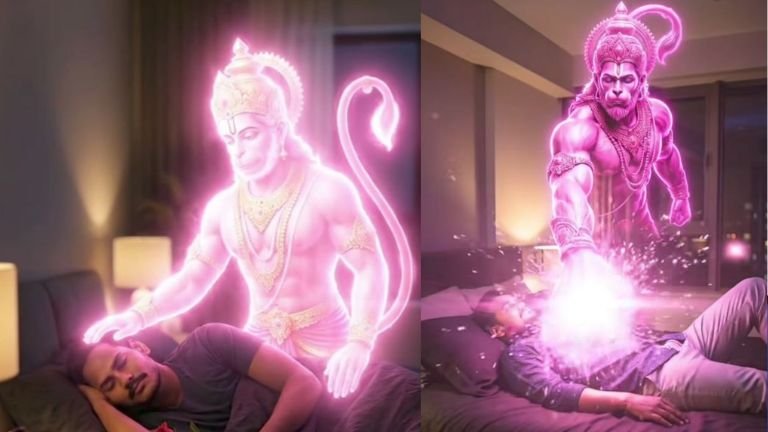
Hanuman Image Prompt:
“A young, dark-haired man with a beard is lying on his back in a modern, dimly lit bedroom, resting on a bed with dark sheets and pillows. He is wearing a patterned shirt and light trousers. A small, vibrant red rose is placed on his chest. Hovering directly above him is a highly detailed, muscular, ethereal pink/magenta holographic figure resembling the Hindu deity Hanuman. The holographic figure is glowing brightly. The room has a bedside lamp and a window showing a blurry city lights view at night. The style should be realistic with strong neon/cyberpunk elements due to the glow of the figure. Cinematic lighting. Vertical shot.”
Keep my face 100% same as in the reference image
https://labs.google/fx/tools/flow
Hanuman Video Prompt:
“A peaceful bedroom at night. A young man sleeps holding a red rose. Keep the man’s face 100% the same as in the reference image. A glowing divine form of Lord Hanuman appears beside him, radiating pink-gold light. Hanuman gently places his hand on the man’s head, transferring bright divine energy and blessings. Golden particles flow into the man as he glows with power. Hanuman slowly rises, transforms into a majestic celestial form, and flies out through the window into the night sky, leaving a trail of divine light. Ultra-cinematic, soft lighting, magical realism, smooth camera movement, high detail.”
AI image and video generation using prompts has opened endless opportunities for creators. Whether you are a beginner or a professional, learning how to write effective prompts can save time, reduce costs, and improve content quality.
By understanding prompt structure, styles, and best practices, you can generate stunning visuals and videos for blogs, YouTube, Instagram, and websites without advanced technical skills.
Mastering AI prompts today means staying ahead in the digital content world tomorrow.